
 Community





qData Product
qData Data Center Platform
Unify data access, development, governance, and services to build a trusted foundation for analytics and AI.
Unify access, development, governance, services, and AI in one data capability system.
Product Architecture

Improve data use across integration, governance, security, and analytics.
Core Product Highlights

Data Convergence
Connect sources with visual sync and batch-stream processing.

Data Development
Build pipelines for integration, orchestration, scheduling, and operations.

Data Governance
Unify lineage, quality, security, and assets for trusted data.

Data Services
Deliver APIs, analytics, and Q&A for faster decisions.
Cover planning, integration, production, governance, assetization, services, and analytics.
End-to-end Core Capabilities

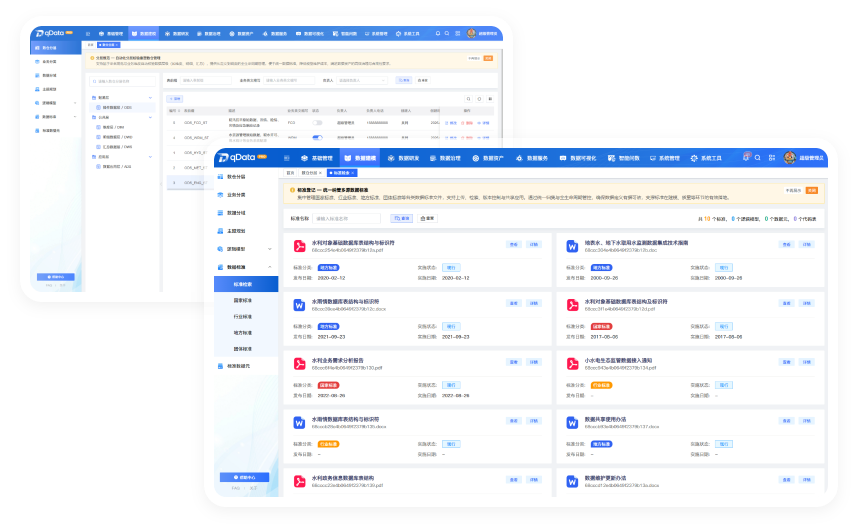
Data Warehouse Modeling
Plan domains, subject areas, and warehouse layers with standard structures, names, and definitions.

Data Ingestion
Connect databases, big-data platforms, queues, APIs, and files with centralized configuration.

Data Integration & Sync
Orchestrate collection, transformation, cleansing, and output for sync, real-time ingestion, and migration.

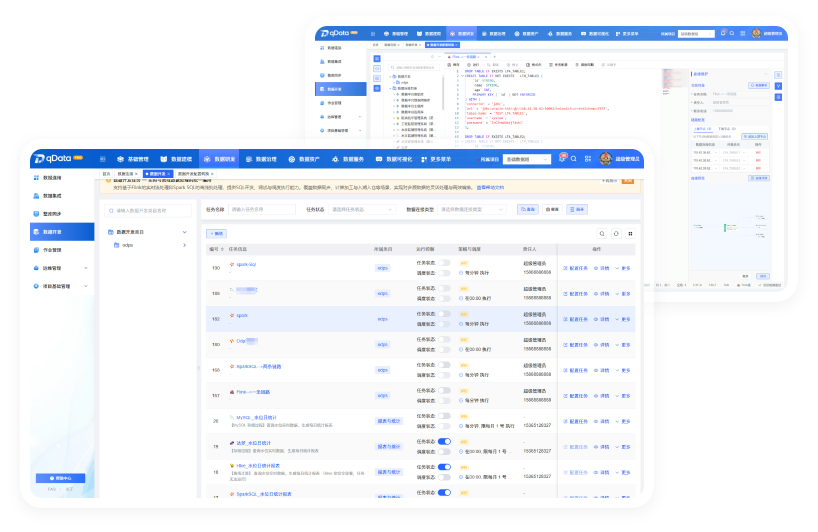
One-stop Data Development
Use an online workspace to write, debug, test, and publish SQL and scripts.

Job Orchestration
Schedule dependent tasks with serial/parallel runs, retries, and runtime monitoring.

Data Governance
Manage metadata, lineage, standards, quality, and security to improve trust.

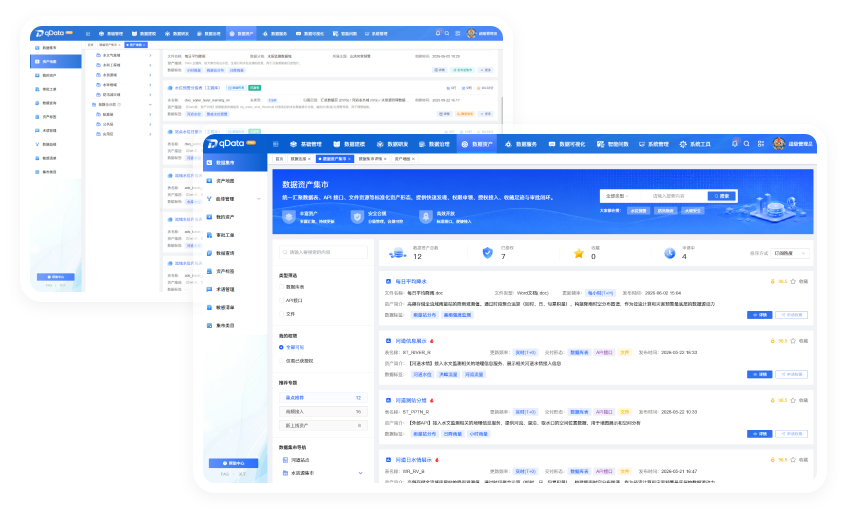
Data Asset Accumulation
Manage tables, files, APIs, tags, terms, lineage, and quality in one searchable view.

Data Services
Package governed data as APIs with publishing, access control, throttling, and monitoring.

Intelligent Data Q&A
Generate SQL, results, and charts from natural language for fast insights.
Practical data solutions for water, manufacturing, agriculture, and more.
Industry Solutions

Industry High-Quality Dataset Development Solution
Build high-quality datasets and turn unstructured data into trainable assets.
Industry High-Quality Dataset Development Solution
Automate cleansing, labeling, and quality checks for AI-ready datasets.
- Auto Preprocessing
- Assisted labeling
- Quality checks
- Data value conversion

Data Security & Compliant Sharing
Classify sensitive data and share it securely across teams.
Data Security & Compliant Sharing
Classify sensitive data, set policies, and support masking and approval.
- Auto Classification
- Metadata-driven Policies
- Masking Approval
- Secure Value Release
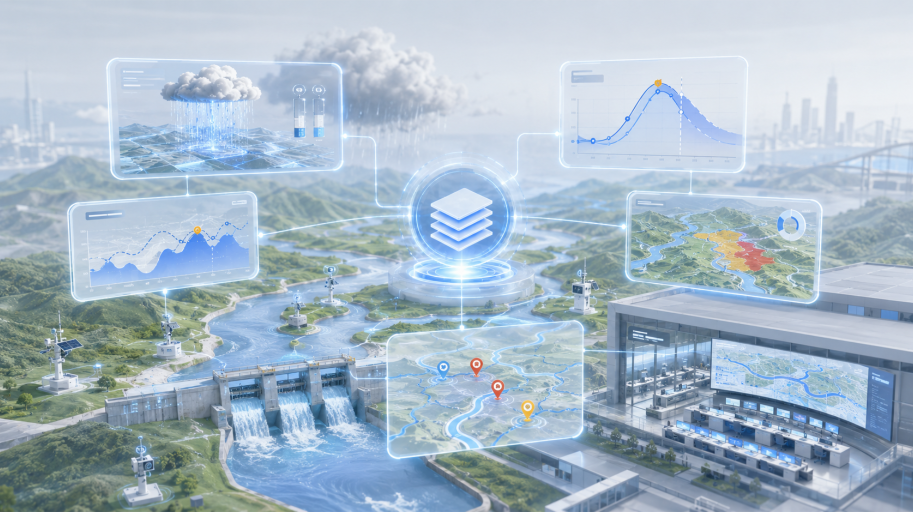
Flood Decision Support
For flood seasons with fragmented historical and real-time data and inconsistent metrics.
Flood Decision Support
Connect historical and real-time data to improve flood forecasting and risk assessment.
- Flood-control Metrics
- Rainfall Calculation
- AI Flood Forecasting
- Risk Tagging
 Industry Scenarios
Support operations and innovation across industries with a unified data foundation.
Group Human Resources
Unify HR analysis across organization, personnel, and compensation data.

Biomedicine
Connect R&D, production, and quality data for drug batch tracking.

Smart Mining
Integrate equipment, personnel, and output data in real time to support production monitoring and safety warnings.

Research Institutes
Improve reuse of experiment, instrument, and project data with governance, lineage tracing, and data services.

City Gas
Connect pipeline, meter, and inspection data for leak analysis and risk judgment.

Smart Port and Shipping
Unify vessel, cargo, and port data with real-time integration.

Construction Engineering
Unify project cost, schedule, and contract analysis through data integration and subject modeling.

Chain Restaurants
Use data marts and Q&A to spot store, member, and inventory changes.

Smart Justice
Connect case, person, and document data to improve investigation efficiency.

Auto Repair Market
Build a vehicle lifecycle view from vehicle, repair, and parts data.

Chosen by Industry Leaders
Work with benchmark customers to upgrade governance and unlock data value.
China National Building Material Group
“qData unified multi-level business data into a reusable foundation for operations, analysis, and management.”




Hubei Digital Industry Group
“qData connected cross-project data, unified standards and catalogs, and improved governance, retrieval, and reuse.”


Shanxi Smart Transportation Research Institute
“qData unified transportation data access and governance, improving sharing, analytics, and smart traffic decisions.”

Data Center Platform Construction for a Large Manufacturing Group
Unify production, equipment, material, quality, and operations data.
Business Pain Points
Inconsistent definitions make cross-system analysis hard.
Solutions
Build a unified data foundation with subject models, quality rules, and service exposure capabilities.
Core Benefits
Shorten demand response from weeks to hours while continuously accumulating reusable data assets.

Industrial Equipment Data Governance
Unify equipment ledgers, operating data, and work orders to support predictive maintenance and production analysis.
Business Pain Points
Equipment data is scattered across systems, and O&M analysis lacks a unified view.
Solutions
Use the Data Center Platform to converge equipment, work order, operating, and inspection data.
Core Benefits
Build an equipment health analysis foundation to improve fault location and O&M response efficiency.

Water Conservancy Data Foundation
Govern multi-source water data for scheduling, alerts, and sharing.
Business Pain Points
Monitoring and business data come from complex sources with inconsistent standards.
Solutions
Establish an integrated chain for water conservancy data ingestion, governance, and service exposure.
Core Benefits
Support cross-system data sharing and watershed business collaboration.
Partners
Benchmark customers across industries rely on qData to unlock data value and lead in the digital era.



From solution planning to product use, quickly learn qData implementation paths, core capabilities, and practices.
Resources
White Papers
A clear guide to architecture, core capabilities, scenarios, and data foundation planning.
- Data Center Platform Construction White Paper
- Enterprise Data Governance Practice Guide
Demo Videos
See data connection, integration, development, lineage, and Q&A in practice.
- Data Center Platform Core Feature Demo
- Lineage Map and Intelligent Q&A Demo
Product Docs
Get deployment, configuration, development, operations, and service publishing guides.
- qData Quick Start Guide
- Data Center Platform Configuration Manual
A quick summary of capabilities, deployment modes, versions, and common questions.
Frequently Asked Questions (FAQ)
What does qData do?
Simply put, qData is the enterprise data steward.
It collects scattered ERP, CRM, and business data, cleans it, unifies definitions, and serves trusted data on demand.
It mainly solves three pain points:
- Break data silos:Solve mismatched departmental data and conflicting statistical definitions.
- Improve data quality:Eliminate dirty data so information is trustworthy and decisions have a solid basis.
- Reuse data assets:Accumulate data as reusable assets and avoid duplicated work.
💡 Note:
qData is not just one piece of software; it is a product suite.
- Core platform:“qData Professional” is the main product, with built-in metadata, master data, and asset management.
- Advanced modules:Professional sub-platforms can be combined as needed.
Why choose qData Data Center Platform?
qData learns from the market while offering these core strengths:
- 🛡️ Source-code delivery and real control:Source authorization turns the platform into a controllable enterprise tech asset.
- 🏗️ Flexible architecture:Switch between monolith and microservices as scenarios scale.
- 🧩 Complete product suite:Includes one main platform plus six flexible sub-platforms.
- 📚 Full-lifecycle business support:Provides documentation for presales, project initiation, bidding, construction, implementation, reporting, and rollout.
- 💡 Deep enablement:Training covers concepts, system use, development, and design.
- 💻 Fully self-developed core:Core capabilities are self-developed for better quality, security, and stability.
- 🚀 Forward-looking technology:The Professional edition uses proven architecture for scalability and maintainability.
- 🔗 Shared AI ecosystem:Shares the same foundation as qThing, qKnow, qModel, qLabel, and qBrain for seamless industry AI solutions.
- ⚙️ Modular design:High cohesion and low coupling reduce development iteration difficulty and O&M cost.
- 🌐 Mainstream technology stack:Fits existing customer and partner technology environments, reducing integration difficulty and learning cost.
- 🔄 Dual-version strategy:Provides both Open-source and Professional editions for different budgets and maturity stages.
In which industries has qData been implemented?
qData is general-purpose data infrastructure for silos, standards, and assetization.
Mature cases and industry solutions currently include:
- 🌊 Water conservancy:Unify watershed data governance and improve flood-control scheduling and water resource decision efficiency.
- 🏙️ Smart parks:Connect security, energy, property, and other data to build a park digital twin foundation.
- 🏭 Intelligent manufacturing:Connect ERP, MES, and other systems to enable transparent production and quality traceability.
- ⛏️ Coal and ⚡ power:Integrate safety production and equipment monitoring data for intelligent energy transformation.
- 🏥 Healthcare and 🎓 education:Improve patient and student data services across systems.
- 🚦 Transportation and logistics:Integrate multimodal traffic data to improve road-network scheduling and logistics collaboration.
💡 Tip:For more industry cases or custom solutions, contact our account managers.
How do Open-source and Professional editions differ?
qData offers Professional and Open-source editions with complementary positioning and smooth upgrade paths.
🏢 Professional Edition: enterprise-grade all-round expert
- Positioning:For large-scale, high-complexity scenarios requiring end-to-end, highly available enterprise solutions.
- Complete capabilities:Covers management, ingestion, modeling, security, and service governance.
- Deep enablement:Includes dedicated intelligent capabilities hardened in production environments.
- Premium services:Provides vendor technical support, customized implementation, and SLA assurance.
- Best for:Medium and large enterprises, critical systems, and scenarios with strict stability and security requirements.
🚀 Open-source Edition: lightweight starter mentor
- Positioning:Focused on core common functions, lightweight and easy to use for quick practice.
- Solid foundation:Includes basic system management, common data source access, standard modeling, and basic quality checks.
- Flexible exploration:Open and transparent code for validation, learning, research, and small or medium deployments.
- Best for:SMEs, individual developers, universities, research teams, and startups.
🔄 Seamless upgrade: same foundation, smooth evolution
Both editions share the same foundation, with official tools and docs for smooth upgrades.
💡 Summary:Start open-source, then upgrade to Professional as your needs grow.
Why buy sub-platforms after the Professional edition?
The main platform covers basics; sub-platforms provide advanced professional capabilities.
1. qData Professional: practical and cost-effective
The main platform includes lightweight metadata, master data, and asset management for common governance needs.
2. Independent professional sub-platforms: built for complex scenarios
Professional sub-platforms support larger scale, complex relationships, profiling, and deep lineage.
💡 Summary:Buy the main platform first, then add sub-platforms as needed.
Which data sources does qData support?
The demo shows examples only; unlisted sources may still be supported.
🌟 Core commitments
- Mainstream coverage:Most common data source types in the market are already supported.
- Free custom support:If a required source is not listed, adaptation can be developed free after contract signing.
- Delivery assurance:Adapting a single new data source usually takes about five person-days.
- Contract assurance:Custom support terms can be written into the sales contract as needed.
📊 Typical supported data sources
- Relational databases:MySQL, PostgreSQL, Oracle, SQL Server, Dameng DM8, KingbaseES, DB2, and more.
- Big data engines:Hive, Phoenix, Doris, ClickHouse, and more.
- Message queues:Kafka, RabbitMQ, and more.
- File storage:FTP, Alibaba Cloud OSS, HDFS, and more.
- Management tool integration:OSCAR and 15+ mainstream database management tools.
💡 Summary:Standard support plus fast customization covers complex architectures.
What is the difference between data integration and data development?
Both turn raw data into data assets, but they differ in processing method, technical implementation, and scenarios.
🔄 Data Integration (visual ETL)
- What it does:Collects, moves, and performs basic cleansing to converge business data into a unified layer.
- How it works:Drag JDBC, Binlog, API, and other input/output components and configure rules for zero-code synchronization.
- Typical scenarios:Multi-system synchronization, database migration and backup, and ODS construction.
💻 Data Development (code-based computation)
- What it does:Computes complex business logic and processes business metrics and wide tables.
- How it works:Uses SQL, Python, or Shell scripts for deep computation.
- Typical scenarios:Management reports, complex dictionary mapping, and historical state backtracking and cleansing.
💡 Summary:Integration brings data in; development computes and adds value.
Does qData support data quality checks and reports?
Yes. Data quality is a core capability under Asset Management - Data Quality:
- 🔍 Flexible quality checks:Create scheduled or triggered quality tasks for automated multi-source inspection.
- ⚙️ Powerful rule configuration:Use built-in rules plus custom SQL, Python, Java, and other inspection rules.
- 📊 Detailed quality reports:Automatically generate multidimensional reports showing health, issue distribution, and trends.
- 🛠️ Closed-loop issue management:Locate, mark, alert, and follow up on exceptions from discovery to resolution.
This module covers most quality scenarios and helps build trusted data assets.
Does data integration support incremental and full synchronization?
Yes. qData supports both full and incremental synchronization, using dynamic cursors for efficient incremental sync.
- Reduce load:Significantly lower pressure on source databases.
- Improve timeliness:Keep data flowing quickly to meet real-time needs.
- Stable and reliable:Native breakpoint resume reduces data loss caused by network fluctuations.
Does qData include BI or reporting?
qData provides BI and visualization through the Data Visualization module.
- Integration strategy:Seamlessly connect mature third-party BI products for stability, professionalism, and feature depth.
- Mainstream support:Planned and supported tools include Quick BI, FineReport, JimuReport, and other mainstream tools.
- Default option:JimuReport free edition is integrated by default for basic reporting needs.
- Customization:If a preferred BI tool is specified, free adaptation service can be provided.
- Procurement support:Commercial licenses can be purchased directly from vendors or with our assistance.
Extend metadata, metrics, tags, master data, and data asset capabilities.
Related Products
News
Curated industry insights focused on product highlights.
qData Data Center Platform Commercial Edition Capability Upgrade
Enhance integration, visual orchestration, and intelligent governance capabilities.
Data Asset Operations Practice White Paper Released
Share paths for catalogs, quality rules, services, and value assessment.
Enterprise Data Governance Implementation Path Explained
Break down reusable governance methods from standards to asset catalogs.
High-quality Dataset Construction Practices
Explore dataset factory workflows for cleansing, labeling, assessment, versions, and services.
Put Data Value Within Reach
From consultation and assessment to tailored solutions, we are ready to help.
Start Free Trial 1v1 Architect
 Tech Support
 O&M Assurance
 Project Support